An export is slow or seems stuck
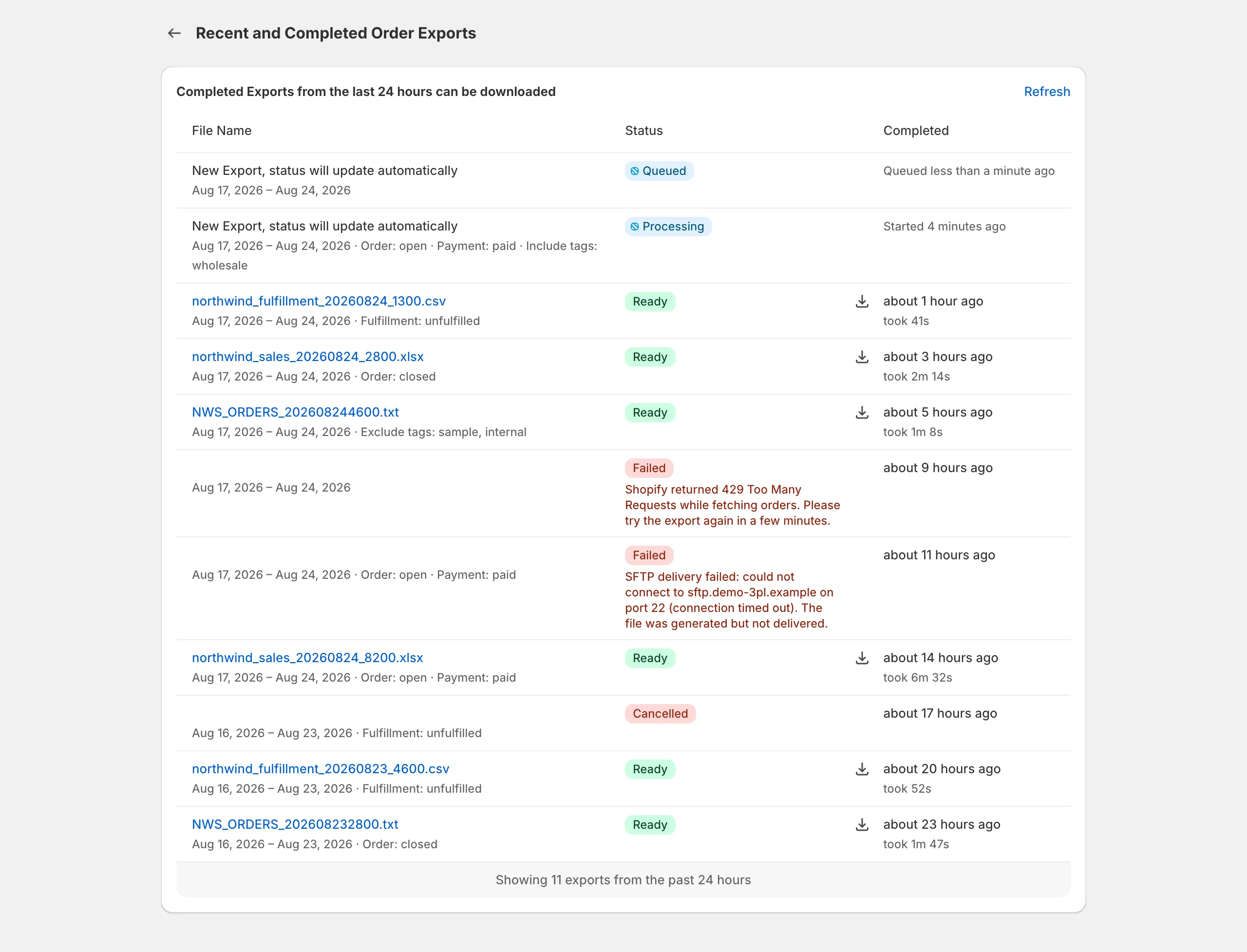
Exports run in the background on Exportify’s servers, so you can leave the page; large ranges take minutes because Shopify hands over orders a page at a time, and Recent exports shows the status.
Exports run in the background on Exportify’s servers, not in your browser. You can leave the page, close the tab, or keep working in Shopify; the export carries on and the file appears under Recent exports when it is ready. Nothing about Exportify slows your store or your admin down.
How long an export should take
Section titled “How long an export should take”A few hundred orders take seconds. Tens of thousands take minutes, because Shopify’s API hands over orders a page at a time and every line item is processed. Exports of 40,000 or more orders in one run are normal and complete; they simply take a while.
What to do if an export seems stuck
Section titled “What to do if an export seems stuck”-
Check Recent exports. The status moves from queued to processing to ready. Processing on a large range for several minutes is expected.
-
Wait it out, or split it. If you would rather have something sooner, cancel and run smaller date ranges, for example a month at a time. Each finishes faster and the files can be combined in a spreadsheet.
-
Look for a failed status. If the export failed, the message says why. Most failures are temporary; running the export again usually works.
-
Still nothing after a long time? Email support@exportifyapp.com with your store’s .myshopify.com address, the template name and the date range. We can see the export on our side.