Support-managed templates
A support-managed template is an export layout Exportify’s support team builds and maintains for you, for layouts that need skip and keep rules, calculated fields, virtual tags, constants or custom XML; request one by emailing a sample file to support@exportifyapp.com.
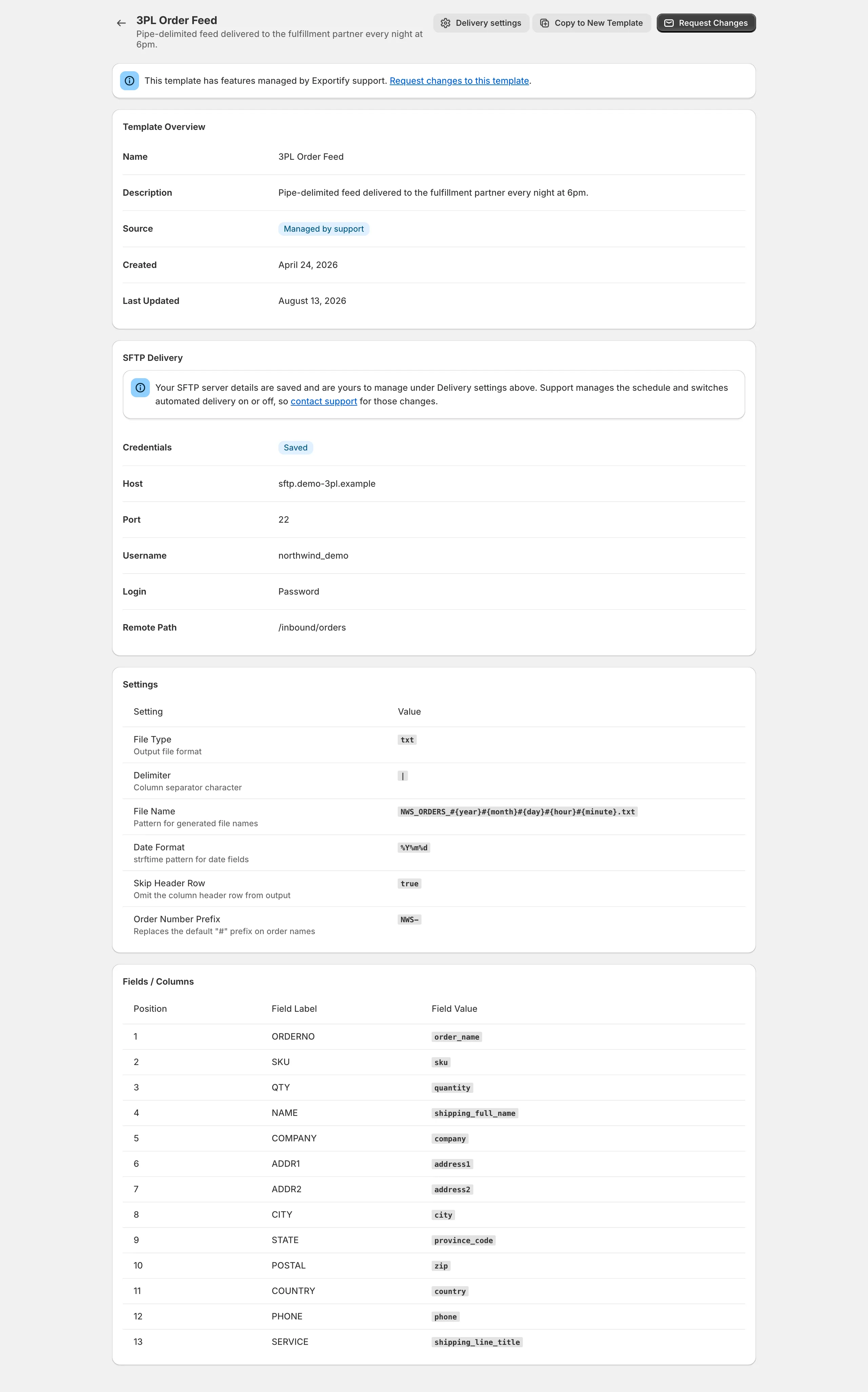
Some export layouts need rules the template builder does not have. For those, we build and maintain the template for you. It appears in your account with a Managed by support badge, you use it exactly like any other template, and you ask us when it needs to change.
What support-managed templates can do that the builder cannot
Section titled “What support-managed templates can do that the builder cannot”- Skip and keep rules for orders and line items, for example only orders tagged
wholesale, or leave out gift card line items. - Calculated fields that produce a value from business logic: combine or split text, look up a warehouse code from a SKU, do arithmetic on quantities and prices, or choose a value based on tags, statuses or other order data.
- Virtual tags that classify orders by compound rules, for example a region from province and city.
- Constant values that repeat on every row, such as an external store ID or channel name.
- First-row-only order values, so totals, addresses and statuses appear on the first line of each order and not on every line item.
- Custom XML structures: element names, wrappers and nesting to match a partner’s schema.
- Automated delivery: scheduled and per-order exports to your SFTP or FTP server are configured on support-managed templates.
Support-managed templates are included with the Standard and Advanced plans.
How to request a support-managed template
Section titled “How to request a support-managed template”Email support@exportifyapp.com with:
- a sample file in the exact layout you need (CSV, delimited text, XML or Excel), with example values in each column
- which orders it should cover, if not all
- any rules: what to skip, how a value is calculated, what goes on the first row only
- how it will be delivered: on demand (download), on a schedule, or per order (SFTP)
We build it in your account and let you know when it is ready to test. You run a test export, we adjust until the file is right, and then it goes live.
Using and changing a support-managed template
Section titled “Using and changing a support-managed template”- It appears in Settings and in the template list when you export, with the badge. Its page shows the layout as read-only.
- To change it, open the template and use Request Changes, or email support. Small changes are usually same-day.
- On the Standard and Advanced plans you can enter and test your own SFTP server details for it under Delivery settings; the layout and schedule stay managed by us. See Deliver exports to your SFTP or FTP server.